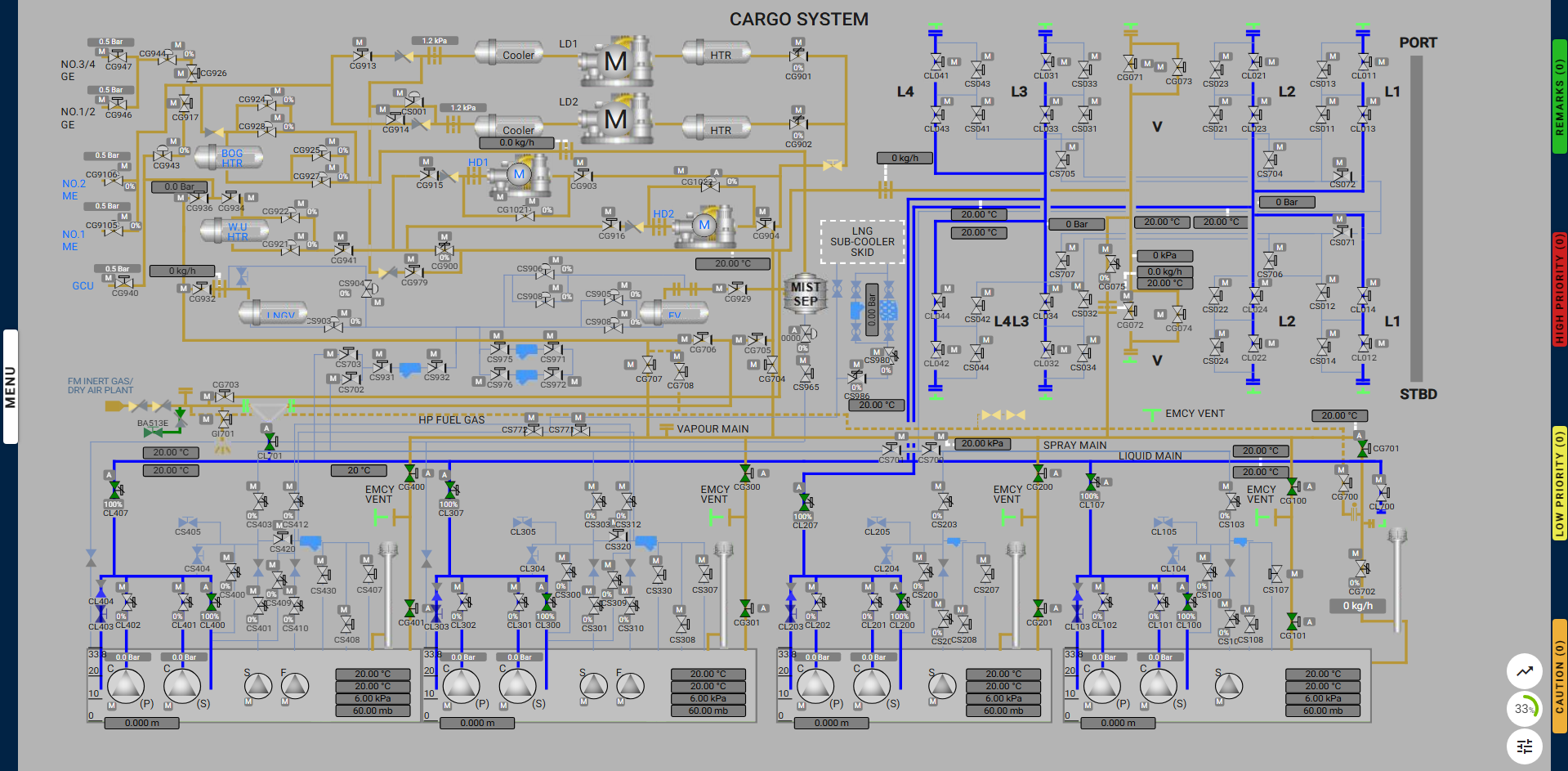
Milestones:
- Learning and Training Phase – Pre-Requisites for the start of operation:
- Start the Portable Multi-Gas Detector and Dew Point Meter
- Install the Spool Piece to Connect the Inert Gas Line to the Liquid Line
- Set the Cargo Tank Vapour Valves
- Set the Cargo Tank Liquid Valves
- Set the Vapour Line to No. 1 Vent Mast Regulating Valve
- Connect the Dry Air Line to the Liquid Line by Opening CL701.
- Prepare the Inert Gas Generator (IGG) in Dry Air Mode
- Assessment Phase – Operational flow and Assessment:
- Start the Inert Gas Generator (IGG) in Dry Air Mode
- Achieve a Cargo Tank Dew Point Below -20°C
- Maintain Cargo Tank Pressure Between 5 kPa and 7 kPa
- Check All Vapour Sampling Points for Dew Point in All Tanks
- Stop the Dry Air Supply Upon Reaching the Required Dew Point
Exercise Actions and Warnings:
- Deviation from Exercise Steps:
- Avoid opening unnecessary valves or closing required ones after starting the drying process.
- If such actions occur, a caution message will instruct you to undo the previous action.
- Failure to correct the deviation will terminate the exercise.
- Maintaining IGG Outlet Flow:
- Keep the IGG outlet flow and flow to the atmosphere between 15,500 kg/h and 16,500 kg/h.
- If a high-priority alarm is triggered, restore the flow within 1 minute, or the exercise will fail and terminate.
Alarms & Remarks:
| Alarm Condition |
Alarm Time |
Alarm Level |
Alarm Title |
Alarm Description |
Action |
|
Supply Started |
Remark |
Drying Of Cargo Tanks Started |
Drying of the cargo tanks has started. |
|
|
On Drying completed |
Remark |
Drying of tanks completed |
Drying of cargo tanks is completed, stop the deivery of inert gas. |
|
|
started delivery of Dry Air |
Remark |
Open Valve CG702 |
Open the valve CG702, To vent out the Normal air. |
|
|
Stopped delivery of Dry Air |
Remark |
Close Valve CG702 |
Drying of tanks is stopped, close the valve CG702. |
|
|
started delivery of Dry Air |
Remark |
Maintain IGG Oulet Flow And Outlet Flow To Atmosphere |
Maintain IGG outlet flow and outlet flow to atmosphere between 15500 kg/h to 16500 kg/h. |
|
| when un necessary valve opened or required valve closed |
|
Caution |
Deviation Detected |
Deviation from the exercise is detected, undo your last action. |
Fails if that valve is not closed or opened within 1 minute |
Step By Step Procedure:
- Learning and Training Phase – Pre-Requisites for the start of operation:
- Start the Portable Multi-Gas Detector and Dew Point Meter:
- Navigate to MENU > Miscellaneous Equipment.
- Press and hold the power button for 2 seconds on both the Portable Multi-Gas Detector and Dew Point Meter until they start operating.
- Install the Spool Piece to Connect the Inert Gas Line to the Liquid Line:
- Navigate to MENU > Cargo System.
- Click to connect the spool piece located above valve CL701, linking the IGG outlet and the cargo tank’s liquid lines.
- Set the Cargo Tank Vapour Valves:
- Open the following valves:
CG100, CG101, CG200, CG201, CG300, CG301, CG400, CG401.
- Set the Cargo Tank Liquid Valves:
- Open the following valves 100%:
CL100, CL107, CL200, CL207, CL300, CL307, CL400, CL407.
- Set the Vapour Line to No. 1 Vent Mast Regulating Valve:
- Connect the Dry Air Line to the Liquid Line:
- Prepare the Inert Gas Generator in Dry Air Mode:
- Navigate to MENU > IGG System.
- Configure the following settings:
- Generator Mode: Set to “Dry Air.”
- Operating Percentage: Set to “100%.”
- Fuel Pump: Set to “Off.”
- IG Chiller Unit: Set to “On.”
- Assessment Phase – Operational flow and Assessment:
- Start the Inert Gas Generator in Dry Air Mode:
-
-
- Wait until the outlet temperature of the IG Chiller Unit is between 2°C and 3°C.
- Click Start to activate the IGG.
- Once started, air flows through the Demister Vessel and the dryer unit, reducing the dew point to below -30°C.
-
-
- Cargo Tank Dew Point < -20°C:
- Monitor the dew point using the Dew Point Meter.
- Once the dew point reaches below -20°C at the vapour line sampling point, this milestone is completed.
- Maintain Cargo Tank Pressure Between 5 kPa and 7 kPa:
- Adjust the tank pressure by regulating the vent mast valves.
- Check All Vapour Sampling Points for Dew Point in All Tanks:
- Open the vapour line sampling points for all tanks and confirm the dew point is -25°C or lower.
- Stop the Dry Air Supply:
- Once all tanks reach a dew point of -25°C, stop the IGG delivery by clicking STOP under the delivery option on the IGG System page.
- Close the vent mast regulating valve CG702.
Gas Properties Display on the Detector:
- Dry Air Properties:
- CH₄: 0% LEL
- O₂: 20.9% vol
Milestones:
- Learning and Training Phase – Pre-Requisites for the start of operation:
- Start the Portable Multi-Gas Detector and Dew Point Meter
- Install the Spool Piece to Connect the Inert Gas Line to the Liquid Line
- Set the Cargo Tank Vapour Valves
- Set the Cargo Tank Liquid Valves
- Set the Vapour Line to No. 1 Vent Mast Regulating Valve
- Connect the Dry Air Line to the Liquid Line by Opening CL701.
- Prepare the Inert Gas Generator (IGG) in Dry Air Mode
- Assessment Phase – Operational flow and Assessment:
- Start the Inert Gas Generator (IGG) in Dry Air Mode
- Achieve a Cargo Tank Dew Point Below -20°C
- Maintain Cargo Tank Pressure Between 5 kPa and 7 kPa
- Check All Vapour Sampling Points for Dew Point in All Tanks
- Stop the Dry Air Supply Upon Reaching the Required Dew Point
Exercise Actions and Warnings:
- Deviation from Exercise Steps:
- Avoid opening unnecessary valves or closing required ones after starting the drying process.
- If such actions occur, a caution message will instruct you to undo the previous action.
- Failure to correct the deviation will terminate the exercise.
- Maintaining IGG Outlet Flow:
- Keep the IGG outlet flow and flow to the atmosphere between 15,500 kg/h and 16,500 kg/h.
- If a high-priority alarm is triggered, restore the flow within 1 minute, or the exercise will fail and terminate.
Alarms & Remarks:
| Alarm Condition |
Alarm Time |
Alarm Level |
Alarm Title |
Alarm Description |
Action |
|
Supply Started |
Remark |
Drying Of Cargo Tanks Started |
Drying of the cargo tanks has started. |
|
|
On Drying completed |
Remark |
Drying of tanks completed |
Drying of cargo tanks is completed, stop the deivery of inert gas. |
|
|
started delivery of Dry Air |
Remark |
Open Valve CG702 |
Open the valve CG702, To vent out the Normal air. |
|
|
Stopped delivery of Dry Air |
Remark |
Close Valve CG702 |
Drying of tanks is stopped, close the valve CG702. |
|
|
started delivery of Dry Air |
Remark |
Maintain IGG Oulet Flow And Outlet Flow To Atmosphere |
Maintain IGG outlet flow and outlet flow to atmosphere between 15500 kg/h to 16500 kg/h. |
|
| when un necessary valve opened or required valve closed |
|
Caution |
Deviation Detected |
Deviation from the exercise is detected, undo your last action. |
Fails if that valve is not closed or opened within 1 minute |
Step By Step Procedure:
- Learning and Training Phase – Pre-Requisites for the start of operation:
- Start the Portable Multi-Gas Detector and Dew Point Meter:
- Navigate to MENU > Miscellaneous Equipment.
- Press and hold the power button for 2 seconds on both the Portable Multi-Gas Detector and Dew Point Meter until they start operating.
- Install the Spool Piece to Connect the Inert Gas Line to the Liquid Line:
- Navigate to MENU > Cargo System.
- Click to connect the spool piece located above valve CL701, linking the IGG outlet and the cargo tank’s liquid lines.
- Set the Cargo Tank Vapour Valves:
- Open the following valves:
CG100, CG101, CG200, CG201, CG300, CG301, CG400, CG401.
- Set the Cargo Tank Liquid Valves:
- Open the following valves 100%:
CL100, CL107, CL200, CL207, CL300, CL307, CL400, CL407.
- Set the Vapour Line to No. 1 Vent Mast Regulating Valve:
- Connect the Dry Air Line to the Liquid Line:
- Prepare the Inert Gas Generator in Dry Air Mode:
- Navigate to MENU > IGG System.
- Configure the following settings:
- Generator Mode: Set to “Dry Air.”
- Operating Percentage: Set to “100%.”
- Fuel Pump: Set to “Off.”
- IG Chiller Unit: Set to “On.”
- Assessment Phase – Operational flow and Assessment:
- Start the Inert Gas Generator in Dry Air Mode:
-
- Wait until the outlet temperature of the IG Chiller Unit is between 2°C and 3°C.
- Click Start to activate the IGG.
- Once started, air flows through the Demister Vessel and the dryer unit, reducing the dew point to below -30°C.
- Cargo Tank Dew Point < -20°C:
- Monitor the dew point using the Dew Point Meter.
- Once the dew point reaches below -20°C at the vapour line sampling point, this milestone is completed.
- Maintain Cargo Tank Pressure Between 5 kPa and 7 kPa:
- Adjust the tank pressure by regulating the vent mast valves.
- Check All Vapour Sampling Points for Dew Point in All Tanks:
- Open the vapour line sampling points for all tanks and confirm the dew point is -25°C or lower.
- Stop the Dry Air Supply:
- Once all tanks reach a dew point of -25°C, stop the IGG delivery by clicking STOP under the delivery option on the IGG System page.
- Close the vent mast regulating valve CG702.
Gas Properties Display on the Detector:
- Dry Air Properties:
- CH₄: 0% LEL
- O₂: 20.9% vol
- CO: 0 ppm
- CO₂: 0% vol
- Dew Point: -25°C
- Air Temperature: -25°C
- Relative Humidity: 0%
- Warm Vapour Properties:
- CH₄: 0% LEL
- O₂: 20.9% vol
- CO: 0 ppm
- CO₂: 0% vol
- Dew Point: 18°C
- Air Temperature: 30°C
- Relative Humidity: 39%
- Mixed Gas Properties:
- Values will vary between the ranges above, depending on the proportions of dry air and normal air.
Proper Line Up For Drying: